


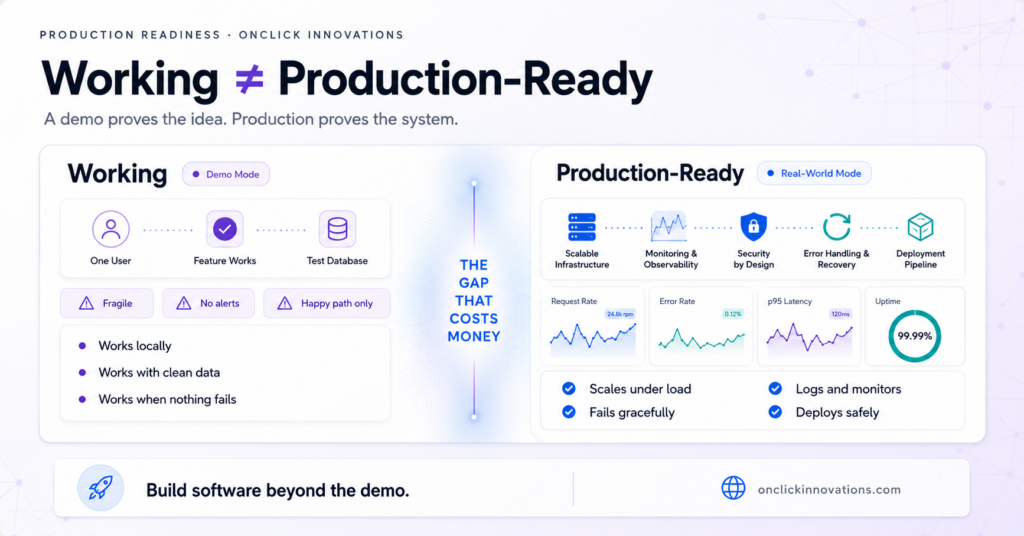
One of the biggest mistakes founders, CTOs, and product teams make is assuming that if software is working, it is ready for production.
But those two things are very different.
“Working” means the software can perform the expected task in a controlled environment.
“Production-ready” means the software can survive real users, real data, real traffic, real failures, and real business pressure.
This gap is where many software projects fail.
What “Working” Software Really Means
When a feature is working, it usually means it does what it is supposed to do under ideal conditions.
- It works on the developer’s machine.
- It works with test data.
- It works when the user follows the expected path.
- It works when all third-party services are available.
- It works when only one person is using it.
That is useful, but it is not enough.
A working feature can still break under real-world conditions. It may look good in a demo, pass basic testing, and still fail badly once actual users start depending on it.
What Production-Ready Software Actually Means
Production-ready software is built for real business use. It is not just about whether the main feature works. It is about whether the entire system can operate reliably, securely, and predictably after launch.
Production-ready software should be able to:
- Handle many users at the same time.
- Accept bad input without crashing.
- Fail gracefully when dependencies go down.
- Log important errors so issues can be debugged quickly.
- Recover from failures without losing data.
- Protect against common security risks.
- Monitor performance and errors before users complain.
- Support safe deployment, rollback, and future updates.
- Be understandable for developers who did not originally build it.
That is the real difference.
Working software proves that an idea can function. Production-ready software proves that a business can depend on it.
The Difference Between a Demo and a Business
A demo is usually built around the happy path. The user clicks the right buttons, enters valid data, and everything behaves as expected.
A real product is different.
Users enter unexpected data. Networks fail. Payment providers go down. Servers slow down. APIs time out. Databases receive duplicate requests. Bots attack forms. A new deployment breaks something that was working yesterday.
This is why production readiness matters.
The real test of software is not whether it works when everything goes right. The real test is whether it behaves safely when something goes wrong.
Real Examples of Software That Was “Working” but Not Production-Ready
1. The Payment Flow That Charged Users Twice
The payment flow worked perfectly during testing. One user clicked “Pay,” the transaction went through, and the order was created.
But in production, two requests came in at almost the same time. The system did not handle duplicate transactions properly, and the customer was charged twice.
The feature was working. It was not production-ready.
2. The Login System That Crashed on Unexpected Input
The login system worked with normal usernames and passwords. But when a user entered an unusual character, such as an emoji, the system failed because input validation and database handling were not strong enough.
A production-ready system should expect unexpected input. It should validate, sanitize, reject, or safely process data without taking down the application.
3. The App That Failed on Launch Day
The application looked smooth in the demo. Pages loaded quickly, the interface worked, and the product felt ready.
Then launch day came. Hundreds of real users opened the app at the same time, and pages started taking 30 to 45 seconds to load.
The app worked in testing, but it had not been designed or tested for scale.
4. The API That Failed When a Third-Party Service Went Down
The API worked well as long as every dependency was available. But when one third-party service went offline, the entire application stopped responding.
A production-ready system should not collapse completely because one external service fails. It should use timeouts, retries, fallback behavior, and graceful error handling.
5. The Feature That Broke Silently
A new feature was released on Friday. It appeared to work, and the team moved on.
By Monday, users had already experienced problems, but nobody on the team knew because there was no monitoring, no alerting, and no visibility into the failure.
Production-ready software does not depend on users to report every problem. It should detect issues early through monitoring, logging, and alerts.
Why Rushing to “Working” Becomes Expensive
The most expensive software is often not the software that takes longer to build properly.
The most expensive software is the software that has to be rebuilt because the first version was rushed to “working” and called complete.
When production readiness is ignored, the cost usually appears later in the form of:
- Emergency bug fixes
- Lost customer trust
- Failed launches
- Security vulnerabilities
- Data loss
- Poor performance
- Developer confusion
- Expensive rewrites
Many teams think they are saving time by skipping error handling, monitoring, documentation, scalability planning, and security review.
In reality, they are often moving the cost from development time to business risk.
A Simple Production-Ready Software Checklist
Before calling any feature complete, ask these questions:
- What happens if two users perform the same action at the same time?
- What happens if the user enters invalid or unexpected data?
- What happens if a third-party API is slow or unavailable?
- What happens if the database request fails?
- What happens if traffic suddenly increases?
- Can we detect errors before users complain?
- Can we roll back safely if something breaks?
- Is sensitive data protected properly?
- Can another developer understand and maintain this code?
- Is the system documented well enough for future changes?
If the answer to these questions is unclear, the software may be working, but it is not fully production-ready.
Production-Ready Software Is a Business Decision
Production readiness is not just a technical concern. It is a business decision.
For founders and CTOs, the goal is not only to launch fast. The goal is to launch in a way that can support users, protect the business, and create a foundation for growth.
A product that only works in a demo may impress people for a moment.
A product that is production-ready can support customers, revenue, operations, and long-term growth.
Working is the starting point. Production-ready is the standard.
How Onclick Innovations Builds Production-Ready Software
At Onclick Innovations, “working” is never the finish line.
We build software with production readiness in mind from day one. That means error handling, monitoring, security, scalability, clean architecture, and documentation are not treated as afterthoughts.
They are part of the foundation.
Whether you are building a startup MVP, a SaaS platform, a custom web application, an internal business tool, or a scalable digital product, the difference between “working” and “production-ready” can decide how reliable your product becomes after launch.
If you need developers who can build beyond the demo, Onclick Innovations can help.
Visit: www.onclickinnovations.com