

Published by Onclick Innovations · AI Development · May 2026 · 7 min read
There is a quiet revolution happening underneath all the noise about AI agents, LLMs and automation tools. And most developers — even experienced ones — have not fully tuned into it yet.
It is called the Model Context Protocol. And it is about to change how every AI-powered application is built.
If you have been following AI development in 2026, you have probably heard the phrase “MCP” appearing more and more in developer communities, GitHub repositories and engineering blogs. This post explains exactly what it is, why it matters, and what it means for businesses building with AI right now.
What Is the Model Context Protocol (MCP)?
The Model Context Protocol — MCP — is an open standard created by Anthropic that defines a universal way for AI agents to connect to external tools, APIs, databases and data sources.
Before MCP, connecting an AI model to your business tools was a custom engineering problem every single time. Want your AI assistant to query your PostgreSQL database? Custom integration. Want it to read files from your server? Custom code. Want it to post to Slack, search GitHub, call your internal API? Custom. Custom. Custom.
Every integration was bespoke, fragile and expensive to maintain. And when you switched AI models — from GPT to Claude to Gemini — you had to rebuild those integrations from scratch.
MCP fixes this entirely.
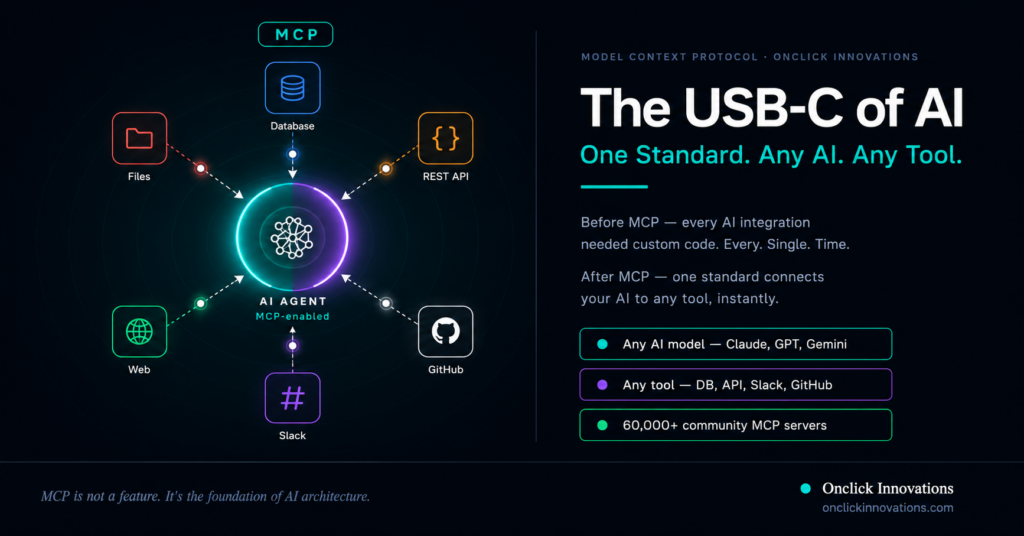
Think of it exactly like USB-C. Before USB-C, every device had its own proprietary connector. Laptops, phones, cameras — all different. Then USB-C arrived: one standard, one connector, everything works with everything.
MCP is that moment for AI. One standard protocol. Any AI model. Any tool. Plug and play.
How Does MCP Actually Work?
MCP defines a client-server architecture where:
- MCP Hosts are the AI applications — Claude, Cursor, your custom agent — that want to use external tools
- MCP Clients are built into the host and manage connections to MCP servers
- MCP Servers are lightweight programs that expose specific capabilities — a database, an API, a file system — through the MCP standard
When an AI agent needs to query your database, it sends a standardised MCP request to the database MCP server. The server handles the query and returns the result. The AI never needs custom integration code — it speaks MCP, and anything with an MCP server speaks back.
The protocol covers three core capability types:
- Resources — data the AI can read (files, database records, API responses)
- Tools — actions the AI can take (run a query, send a message, create a file)
- Prompts — templated interactions for common workflows
What Can an MCP-Enabled AI Agent Connect To?
Here is what an AI agent with MCP can do out of the box — without any custom integration code:
- Query your PostgreSQL, MongoDB or any SQL/NoSQL database in real time
- Read and write files on your server or local file system
- Call any REST API or internal microservice
- Search the web and return live, cited results
- Interact with GitHub — read repos, create issues, submit pull requests
- Send and read Slack messages, create channels, notify teams
- Read and update Notion pages, Jira tickets, Linear issues
- Execute code and return outputs in real time
- Access memory and maintain context across sessions
All of this — through one standard. No bespoke glue code. No fragile custom connectors. Just MCP.
Why MCP Is Winning — Fast
MCP was released as an open-source standard in late 2024. By 2026, the adoption curve has been extraordinary:
- Already integrated natively into Claude, Cursor, Windsurf, Zed and dozens of other AI tools
- Over 60,000 MCP servers built by the community in months
- Microsoft, Google and AWS all actively integrating MCP support
- Adopted by the Agentic AI Foundation (AAIF) as part of open agent standards
- Supported across OpenAI, Anthropic and open-source model providers
This is not a proprietary vendor play. MCP is a genuine open standard — like HTTP for the web or USB-C for hardware — and it is becoming the lingua franca of AI tool connectivity.
MCP vs Custom Integrations — The Real Comparison
To understand why MCP matters, compare the two approaches side by side:
Without MCP (custom integrations):
- Each tool connection requires unique code per AI model
- Switching AI models means rebuilding integrations
- Maintenance burden grows with every new connection
- Fragile — breaks when APIs update
- No standardised security or permission model
- Weeks of engineering for each new tool connection
With MCP:
- One integration pattern works with any MCP-compatible AI
- Switch AI models without touching integration code
- Community maintains thousands of pre-built MCP servers
- Standardised security, permissions and error handling
- New tool connections built in hours using existing servers
- Your integration work compounds — not duplicates
The productivity difference is not marginal. Teams building MCP-native AI systems are shipping tool integrations in hours that previously took weeks.
Real-World Use Cases Across Industries
Healthcare
An MCP-enabled AI agent queries patient records, checks appointment databases, sends WhatsApp reminders and updates clinical notes — all through standardised MCP connections to each system. No custom middleware. No integration overhead.
E-Commerce
An AI agent monitors inventory via MCP database connection, triggers reorders through the supplier API MCP server, updates product listings and notifies the team in Slack — automatically, end-to-end.
Fintech
A compliance agent reads transaction data through a database MCP server, checks regulatory databases via API MCP servers, flags anomalies and generates reports — without a single bespoke integration.
Enterprise Software Teams
Developers use MCP-enabled AI assistants that can read the codebase, query internal documentation, create GitHub issues, update Jira tickets and post Slack updates — all within one AI session, all through MCP.
How to Start Building With MCP in 2026
If you are ready to explore MCP for your business or product, here is how to approach it:
Step 1: Identify your tool connections
List every external tool, database and API your AI agent will need to access. Each one is a candidate for an MCP server.
Step 2: Check for existing MCP servers
The community has built MCP servers for most common tools — PostgreSQL, MongoDB, GitHub, Slack, Notion, Jira, web search and more. Check the official MCP server registry before building custom ones.
Step 3: Choose your MCP-compatible AI host
Claude, Cursor, Windsurf and many other AI tools support MCP natively. Your custom AI agent can also implement MCP client support using the official SDKs available in Python, TypeScript and more.
Step 4: Build or deploy your MCP servers
For tools without existing MCP servers, building one is straightforward. Anthropic provides comprehensive SDK documentation and the protocol is well-specified.
Step 5: Design your agent architecture around MCP
Rather than bolting MCP on afterward, design your agent to be MCP-native from day one. This means every tool connection goes through MCP — making your system maintainable, scalable and AI-model-agnostic.
What This Means for Engineering Leaders
If you are a CTO, VP of Engineering or engineering lead making AI architecture decisions in 2026, MCP should be on your radar for one simple reason:
The cost of not adopting MCP is technical debt that compounds every time you add a new AI integration.
Every custom integration you build today without MCP is an integration you will eventually need to rebuild — either when you switch AI models, when APIs change, or when the maintenance burden becomes unsustainable.
MCP-native architecture is not just a developer convenience. It is a strategic decision that determines how much engineering flexibility your team will have in 12 months.
“Before MCP, every AI integration was custom code. After MCP, one standard connects everything. The difference is not incremental — it is architectural.”
How Onclick Innovations Builds MCP-Native AI Systems
At Onclick Innovations, we build production-ready AI agent systems using MCP as the core integration layer.
Whether you need an AI agent connected to your existing CRM, a multi-agent system orchestrating workflows across your entire tech stack, or a custom MCP server for a proprietary internal tool — we design and build it properly from day one.
Our MCP-native approach means:
- Your AI agent connects to all your tools through a single, maintainable architecture
- Switching or upgrading AI models does not require rebuilding your integrations
- New tool connections are added in hours using existing MCP servers
- Your system is built on open standards — no vendor lock-in
- Full security guardrails, permission management and audit trails built in
We serve businesses across India, Canada, USA, UK and Europe — from startups building their first AI-powered product to enterprises integrating AI into existing systems.
📩 Get in touch → www.onclickinnovations.com
📍 Based in Mohali, India · Serving clients globally across 10+ countries
Frequently Asked Questions About MCP
What does MCP stand for?
MCP stands for Model Context Protocol. It is an open standard created by Anthropic that allows AI agents to connect to external tools, APIs, databases and data sources through a universal interface.
Is MCP only for Claude AI?
No. Although Anthropic created MCP, it is an open standard. It is already supported by Claude, Cursor, Windsurf, Zed and many other AI tools. OpenAI, Google and Microsoft are all actively integrating MCP support.
Do I need to build MCP servers from scratch?
Not necessarily. The community has built MCP servers for most common tools including PostgreSQL, MongoDB, GitHub, Slack, Notion, Jira and web search. You only need to build custom MCP servers for proprietary or internal tools.
How is MCP different from a regular API integration?
A regular API integration is custom-built for one specific AI model and one specific tool. MCP is a universal standard — build once and it works with any MCP-compatible AI model and any MCP-enabled tool.
Can Onclick Innovations build a custom MCP integration for our business?
Yes. We design and build MCP-native AI systems and custom MCP servers for businesses across every industry. Contact us at onclickinnovations.com to discuss your requirements.
Is MCP secure for enterprise use?
MCP includes standardised security, permission management and access control as core parts of the protocol. Enterprise deployments can implement sandboxing, audit trails and role-based access through MCP’s built-in security model.