


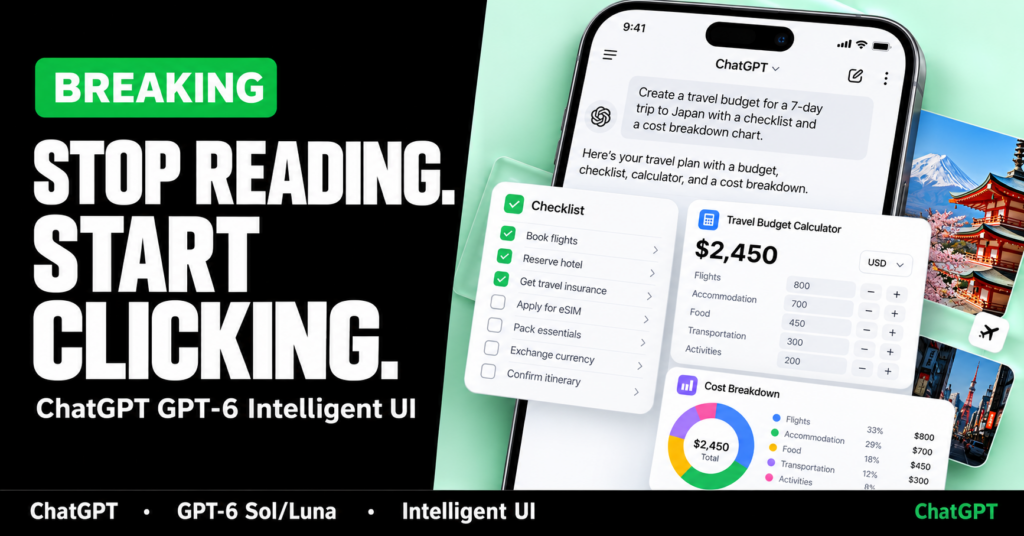
For years, ChatGPT answered almost everything the same way: a wall of text, maybe a list, maybe a table if you asked. On 7 October 2026, OpenAI began rolling out GPT-6 in the Chat tab with something different. The model can now reply with charts, forms, tappable buttons, diagrams and small tools built inside the conversation. OpenAI calls the feature Intelligent UI.
That sounds like a cosmetic update. It is not. If the chat window can assemble a working interface on demand, the line between “asking an AI” and “using software” gets thinner. For founders, product teams and developers who hire software companies—or who are deciding whether to build another dashboard—this matters more than another model name on a pricing page.
This post separates what OpenAI has announced from what remains unproven, explains how Intelligent UI is supposed to work, and sets out what businesses in India and abroad should do with it now.
What OpenAI announced
On 7 October 2026, OpenAI published “GPT-6 and Intelligent UI for everyone.” The company said it was bringing a new GPT-6 experience to ChatGPT’s Chat tab, with Intelligent UI as the headline capability. Paid plans—Plus, Pro, Business and Enterprise—began the rollout that day. Free and Go were scheduled to follow from 8 October.
OpenAI also restated a figure it uses often: more than 1.2 billion people use ChatGPT each week. That number is OpenAI’s own. It has not been independently audited in the material cited for this post, so treat it as a company claim, not a verified census.
Two models sit behind the Chat experience:
- GPT-6 Sol for Plus, Pro, Business and Enterprise
- GPT-6 Luna for Free and Go
OpenAI says both are tuned for everyday conversation. Enterprise access still depends on workplace admin settings, so a “global” rollout does not mean every managed workspace sees the model on day one.
One boundary is easy to miss. OpenAI stated that this update applies to the Chat experience. The models powering Work and Codex were not changing as part of this release. If your team lives in those surfaces, do not assume you automatically got the same Intelligent UI stack.
What Intelligent UI actually is
Intelligent UI is OpenAI’s name for letting GPT-6 compose a response from text, visuals and interactive elements, and choose the mix based on the question. According to the company, a reply can include:
- graphics and charts
- tappable buttons
- forms
- interactive diagrams
- small in-conversation tools, such as a calculator, bill splitter or simple game
No special prompt is required. OpenAI’s help documentation says ordinary text answers are still possible when that format is more useful. You can also ask ChatGPT to build a tool for the task in front of you.
OpenAI’s own demos lean on everyday examples: exploring the systems of a bicycle with selectable parts; a Sunday roast plan that scales shopping quantities with guest count; timelines and checklists that sit beside the recipe. The point of those demos is not cookery. It is that the answer is no longer only paragraphs—it is a small interface assembled for one job.
OpenAI’s longer framing is ambitious: for decades people learned fixed software interfaces; the company says it wants software that adapts to people instead. That is a product vision statement, not a guarantee that ChatGPT will replace your CRM next quarter.
How it works under the hood (as OpenAI describes it)
OpenAI’s explanation has three moving parts.
1. A library of native, streamable components
Rather than inventing a brand-new design language for every answer, GPT-6 draws from a component library. That library is meant to keep the look familiar across web and mobile while still letting the model decide which pieces to use and how to arrange them.
2. A compiler that streams the interface
A compiler processes the interface as the model generates it. The interface can appear progressively, without waiting for the full response to finish. That is why OpenAI emphasises speed alongside visuals: the UI is not a post-processing step bolted on after the text is done.
3. Training for layout judgement
OpenAI says it expanded training so the model judges content, layout, visuals and interaction—clarity, usefulness and completeness included. The model is supposed to learn when interactivity helps and when plain text is enough. OpenAI also admits there is still work ahead on the model’s design judgement and on what it can create.
Everything in this section is OpenAI’s architecture description. Independent teardown of the compiler, component set or training data has not been published in the sources used here.
Faster answers: interleaved thinking and streaming
Intelligent UI is only half of the GPT-6 Chat story. OpenAI also says GPT-6 can begin answering while it continues to think. Instead of waiting for a full “reasoning” pass before any text appears, the model can interleave thinking with answering and add useful partial responses as it goes.
OpenAI published several internal evaluation claims. Flag these clearly as company benchmarks:
- In an internal evaluation of high-value, everyday agentic tasks, GPT-6 Extra High began answering in the same amount of time as GPT-5.6 Medium while scoring better overall than GPT-5.6 Extra High.
- For questions that need web search, GPT-6 Instant started answering 44% sooner, on average, than GPT-5.6 Instant.
- OpenAI also says GPT-6 improved when to search the web and how reliably it finds supporting information, again on internal evaluations of difficult problems.
Those numbers are useful directional signals. They are not third-party lab results. If you are writing a business case, label them as OpenAI’s own measurements.
Who gets what, and where it does not work
Availability is more nuanced than the marketing headline.
- Chat tab only for this Intelligent UI rollout — Work and Codex model stacks were explicitly left unchanged in the 7 October announcement.
- Thinking levels Instant through Extra High — OpenAI’s help centre says Intelligent UI capabilities roll out on web and supported updated apps when you use GPT-6 at Instant through Extra High.
- Not with Pro effort — Pro effort remains powered by GPT-6 Astra and does not get these Intelligent UI capabilities.
- Older desktop apps — The older ChatGPT desktop apps for macOS and Windows do not support these capabilities; OpenAI tells users to use ChatGPT on the web instead.
- Mobile — Update to the latest app version.
- No separate quota — Intelligent UI does not have its own allowance. Existing model, tool and plan limits still apply.
- Staged rollout — If GPT-6 is missing from the model menu, OpenAI says it may not be available for your account yet.
On ChatGPT web, Settings includes a “Layout and visuals” control to reduce visual elements. OpenAI notes that some visuals may still appear; the switch is not a full classic text-only mode.
There is also a documentation lag worth knowing. Notebookcheck pointed out that OpenAI’s help page still described GPT-5.6 Luna as the Free/Go default in places, while the 7 October release notes name GPT-6 Luna for those tiers. When company pages disagree, prefer the dated product announcement for the Intelligent UI launch, and treat the help centre as a living document that may trail the blog by a few days.
What is confirmed versus what is still unknown
Confirmed (from OpenAI’s own posts and help docs)
- Intelligent UI exists as a ChatGPT Chat capability tied to the GPT-6 rollout announced on 7 October 2026.
- Paid tiers use GPT-6 Sol; Free and Go are on GPT-6 Luna for this Chat experience.
- Responses can mix text with interactive UI elements; plain text remains an option.
- Work and Codex were not updated as part of this specific release.
- Older desktop apps lack support; web is the fallback OpenAI recommends.
Self-reported or internal-only
- Weekly active user figure (1.2 billion+)
- Latency and quality gains versus GPT-5.6 (including the 44% figure)
- Safety improvements relative to earlier GPT-6 / Astra work
Still unknown or not public
- How often the model chooses a weak or cluttered UI in real traffic
- Whether generated tools persist reliably across devices and sessions in ways teams can depend on for operations
- Exact component catalogue available to the model
- Whether businesses can brand, audit or freeze a generated UI the way they freeze a shipped product
- Independent benchmarks of Sol versus Luna quality for the same prompts
OpenAI’s October safety materials for GPT-6 Sol and Luna treat the models as High capability in cybersecurity and biological/chemical domains under its Preparedness Framework—matching the company’s assessment for the GPT-5.6 counterparts—and below the High threshold for AI self-improvement. That is OpenAI’s framework language, not a regulator’s classification.
What this means for businesses
Intelligent UI changes the default expectation of an AI chat: people will start asking for interfaces, not only explanations. That affects support, sales enablement, internal ops and customer education.
Where it helps quickly
- Explainer workflows — Onboarding a complex product, policy or process with diagrams and step checklists.
- Lightweight calculators — Pricing estimators, EMI sketches, capacity planners and bill splitters that do not justify a full app sprint.
- Scenario planning — Changing a slider or guest count and watching quantities update inside the same thread.
- Faster first drafts of UX — Designers and PMs can pressure-test “what if the answer were a form?” before engineering commits.
Where it is a poor substitute for software you own
- Regulated or auditable flows — Payments, KYC, clinical advice, legal filings and anything that needs a fixed, versioned interface.
- Brand-critical experiences — You cannot treat a chat-assembled UI as your product when typography, accessibility and copy must stay under design control.
- Data that must not leave your boundary — Enterprise ChatGPT access still sits inside OpenAI’s product and your admin configuration. That is not the same as a private app on your VPC.
- Multi-user systems of record — Inventory, HRIS, ERP and ticketing need permissions, logs and durable state. A disposable conversation tool is a different category.
For Indian product teams in particular, the practical question is not “Can ChatGPT draw a chart?” It is “Which of our customer journeys are educational or calculative, and which are transactional?” Educational journeys may move into ChatGPT sooner. Transactional journeys still need your stack—UPI, auth, ledgers, support SLAs—and a vendor you can hold to an SLA.
What this means for developers and product teams
Intelligent UI does not retire frontend engineering. It changes where prototypes start and where production still has to live.
Treat ChatGPT as a new distribution surface, not as your only UI runtime. If a prospect can get a working calculator inside ChatGPT, your public marketing site may need an equally clear interactive path—or a clear reason to leave the chat and open your product.
Watch the Sol / Luna split. Free and Go users are not on the same Chat model as Plus and Enterprise. Demos that look polished on a paid seat may feel thinner on Luna. Test both if your audience includes freemium users.
Do not confuse Chat with Work, Codex or the API. This October Chat update is not a blanket platform migration. API and coding workflows follow their own model menus and release notes.
Design for progressive answers. If the model streams a partial UI while it is still thinking, users will interact early. That is good for perceived speed and risky if early widgets show incomplete numbers. Your own products should already handle progressive disclosure; ChatGPT is now training users to expect it everywhere.
Keep a human review loop for anything customer-facing. OpenAI itself frames Intelligent UI as early relative to its longer ambition. Layout judgement will fail sometimes. Shipping a screenshot of a chat UI into a client deck without checking the numbers is how teams get embarrassed.
A simple decision rule
Use this filter before you cancel a build or green-light a new one:
- Is the job mainly explanation, comparison or a one-off calculation?
- Does the user need a durable record, permissions, payments or compliance?
- Would a wrong or ugly interface create brand or legal risk?
If the answer is yes to (1) and no to (2) and (3), try Intelligent UI first and measure whether people finish the task. If (2) or (3) is yes, keep building software you control—and use ChatGPT as a research and prototyping layer beside it, not as the system of record.
FAQ
What is GPT-6 Intelligent UI?
Intelligent UI is OpenAI’s name for GPT-6’s ability in ChatGPT Chat to answer with a mix of text, visuals and interactive elements—such as charts, forms, buttons and small tools—chosen to fit the question, instead of defaulting only to plain text.
When did GPT-6 Intelligent UI start rolling out?
OpenAI announced the rollout on 7 October 2026 for ChatGPT Plus, Pro, Business and Enterprise in the Chat tab, with Free and Go scheduled to follow from 8 October. Access can still be staged by account, and Enterprise depends on admin settings.
What is the difference between GPT-6 Sol and GPT-6 Luna?
For this Chat experience, OpenAI says GPT-6 Sol powers Plus, Pro, Business and Enterprise, while GPT-6 Luna powers Free and Go. Both are described as tuned for everyday conversation. OpenAI has not published a full independent quality comparison for identical prompts in the sources used here.
Does Intelligent UI work in ChatGPT Work and Codex?
The 7 October announcement said the update applies to the Chat experience and that the models powering Work and Codex were not changing as part of that release. Check current OpenAI release notes before assuming parity.
Do I need a special prompt to get interactive answers?
No. OpenAI says no special prompt is required. ChatGPT can still reply with ordinary text when that is more useful, and you can ask it to create a tool when you want one.
Why don’t I see Intelligent UI on the desktop app?
OpenAI’s help documentation says the older ChatGPT desktop apps for macOS and Windows do not support these capabilities and recommends using ChatGPT on the web. On mobile, update to the latest app version.
Should businesses stop building custom apps because of Intelligent UI?
No. Intelligent UI is strong for explainers, comparisons and lightweight calculators inside a chat. Regulated flows, brand-critical product UI, multi-user systems of record and anything needing durable permissions still need software you own and can audit.
Sources and disclaimer: Primary facts are drawn from OpenAI’s 7 October 2026 announcement “GPT-6 and Intelligent UI for everyone,” OpenAI’s GPT-6 help documentation, and OpenAI’s October GPT-6 Sol/Luna safety materials. Secondary reporting from Notebookcheck was used to note rollout timing and documentation inconsistencies. Performance figures, weekly user counts and safety capability labels are OpenAI’s own unless stated otherwise. This article is educational and is not affiliated with OpenAI.